

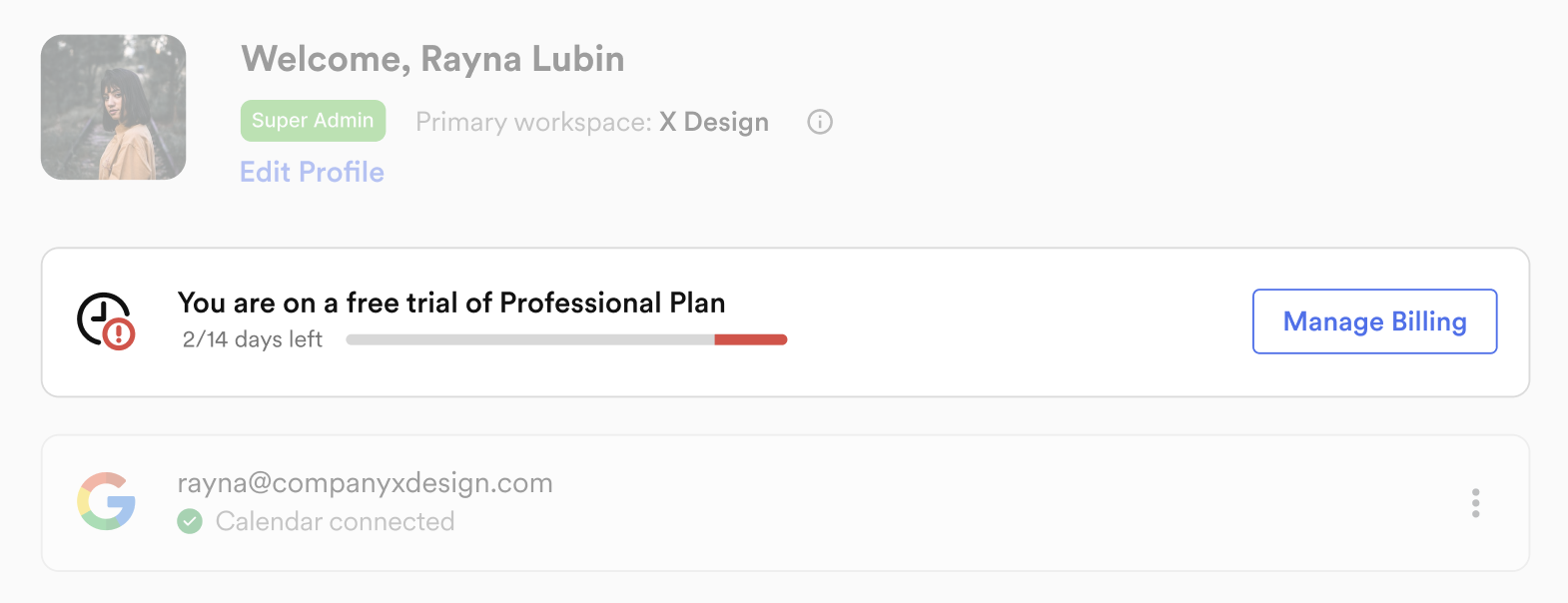
Is there a free trial available for Goodmeetings?
Yes. A standard 14 days free trial of Goodmeetings Professional Plan is available for every company. To avail an extension, please contact your Goodmeetings Sales SPOC.
What approach does Goodmeetings use for billing users?
Goodmeetings uses an active users based billing approach. It is a user-centric pricing model designed to ensure fairness and cost efficiency in your subscription. With this approach, you're only charged for the users who are actively engaging with the product in a given billing cycle. It offers you a flexible and transparent way to manage costs, as you're only paying for the value you're actually receiving. This also keeps us motivated to constantly optimise product experiences that encourage more active users.
Example:Your company X commits to have at least 5 active users. On 1st September, you opt for the Professional Plan invoiced monthly at 70 USD and pre-pay $350 for the upcoming Sep 1 to Oct 1 cycle.
Within the billing cycle (Sep 1 to Oct 1), beyond the agreed 5 active users, two additional users - 6th and 7th - start using Goodmeetings on 15th September. To calculate the pro rata cost for adding a new active user, we’d divide the cost per active user by the number of days in the month, then multiply by the remaining number of days in the month: ($70 ÷ 30 days) x (15 days) = $35
So on 1st October, company X is expected to pay a total of $560, which includes
- Prorated charges for 2 additional active users for past Sep 1-Oct cycle: $35*2=$70
- Charges for 7 active users for the upcoming Oct 1-Nov 1 cycle: $70*7= $490
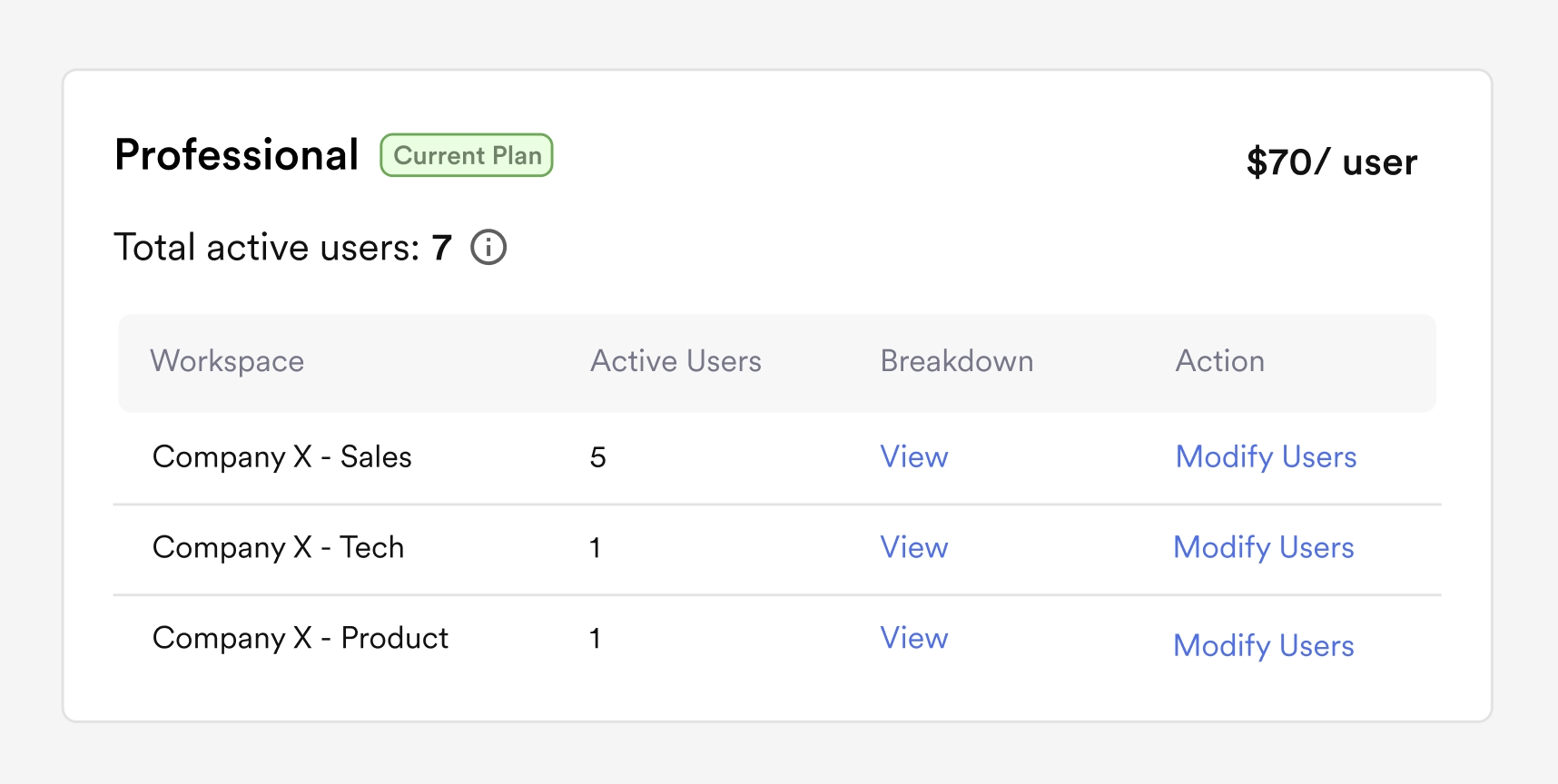
P.S. Note that in case the company doesn’t want to commit for 7 active users in Oct, it has the option to reduce or increase the minimum commitment of active users at the time of payment)
Who is considered as an active user on Goodmeetings?
Any user who has recorded meetings on Goodmeetings within the billing period is counted as an active user. There are multiple ways in which a user could be tagged as a recorder of the meeting and hence, an active user:
- The user connects his calendar and Goodmeetings automatically joins and records meetings scheduled by the user
- The user copy pastes a meeting link and invites Goodmeetings to join a meeting in an ad-hoc manner
- The user is invited to join an external meeting hosted by someone outside his company (as checked from email domain) and is auto assigned recording rights (Note: If more than one people from your company are invited to the meeting, Goodmeetings allocates recording rights randomly to one of you)
Is there a way for a company to control the number of active users on Goodmeetings?
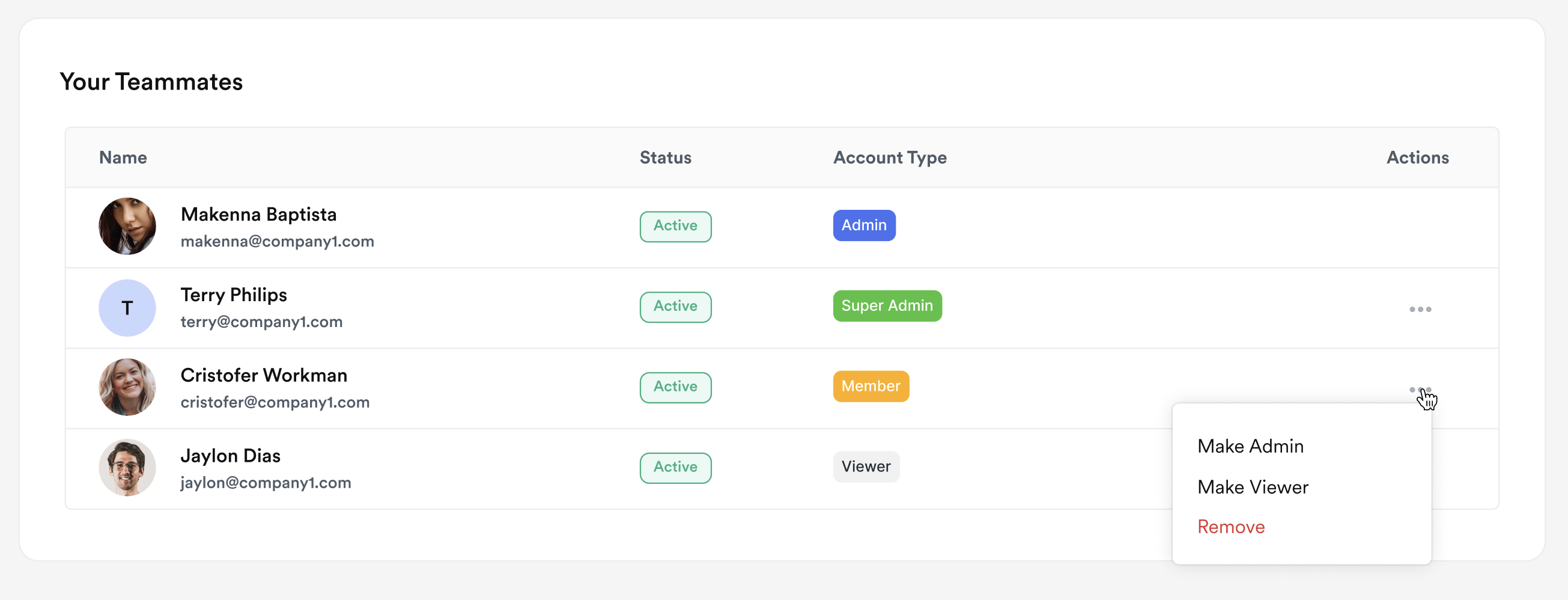
Yes. The Super Admin of a company and the Admin of a workspace can control the number of active users by modifying the role of specific users to “Viewers”.
In any company (broken down further into workspaces), users can be assigned Roles. Any user who is a Super Admin, Admin, or Member has recording rights. Hence, this user can either record a meeting anytime or be attributed as the recorder (as explained in points 1, 2 and 3 in the question above). Hence, such users can become Active Users.
However, any user who is a Viewer does not have any recording rights. He/she can only access meetings recorded by others. The home page that gives access to connect calendar and/or copy paste meeting link to invite notetaker ad hoc is blocked out for a Viewer. In a case where this user had recording rights before and was later converted to a Viewer, the notetaker is barred from joining any of the user’s events.
Are there any other charges other than the amount charged per active user? Are there any discount coupons that can be availed?
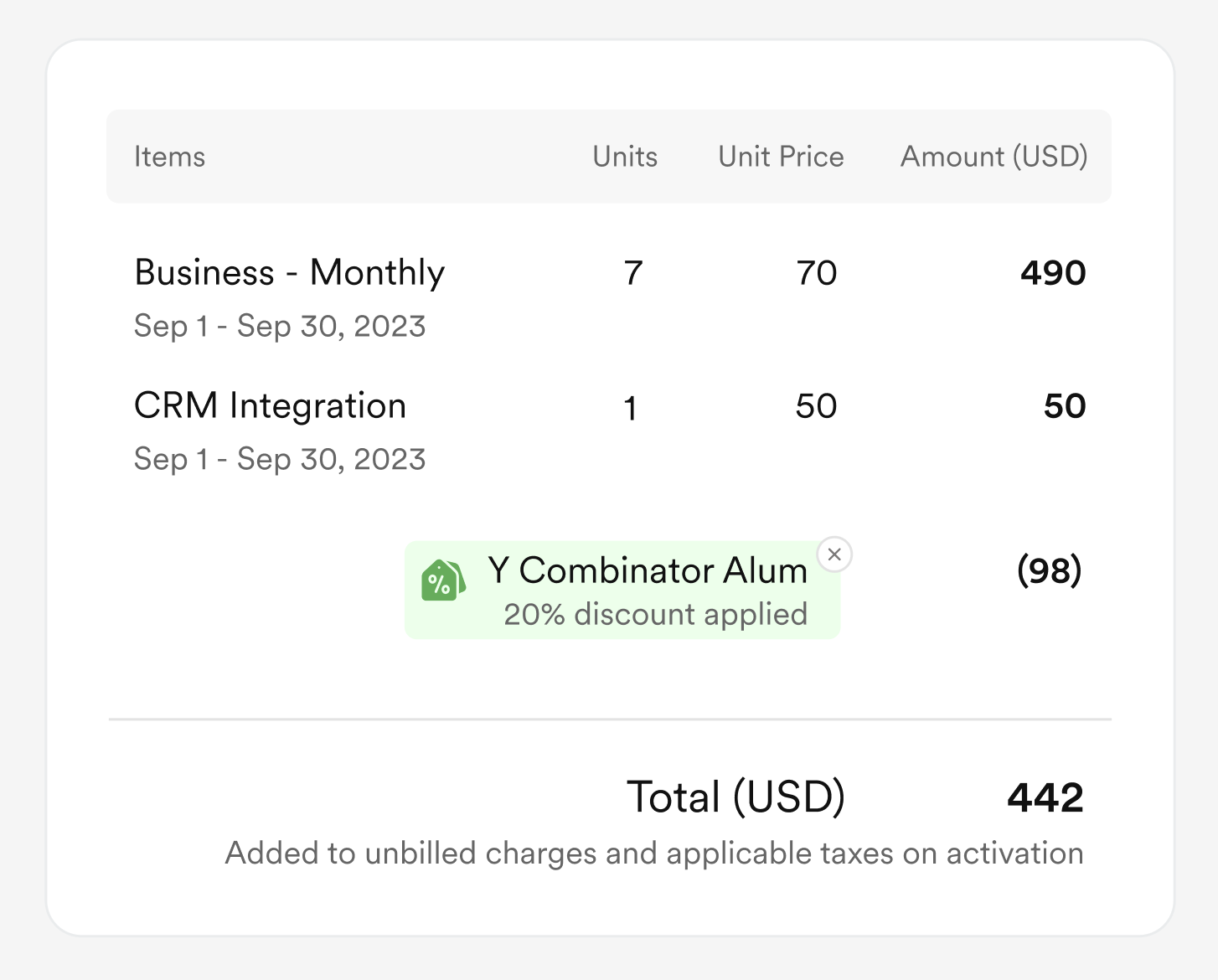
Depends. The Super Admin of a company has the option to purchase add-ons (ex: integration with CRM) at an org level. In case the company requests us to custom develop dashboards, meeting templates etc tailored specifically for their requirements, a one time fee for solutioning & development may also be charged. To avail discounts, the Super Admin can use any valid coupon code and it will apply as a deduction for its validity period on the invoice amount. Coupons cannot be applied retrospectively for invoices already raised.

Example:
Company X wants to opt for a paid subscription of Professional Plan (Monthly billing in USD). As on date, the company has 7 active users. It has opted for a CRM integration (which will also be charged at the same billing frequency i.e. monthly) and availed a YCombinator Alum discount of 20% on the Professional plan.
When does a company have to pay? Is it pre-usage or post-usage?
Anytime before the limited period (i.e. 14 days) free trial of Goodmeetings expires, the Super admin of the company should opt for a paid subscription (choose plan, billing frequency, and currency) and pay in advance for the number of active users it intends to bill on a minimum.
Any additional active users added in the middle of a billing period will be charged on a pro rata basis for the rest of the billing period. This has to be paid in the next invoice released on the 1st of the next month.
However, if the number of actual active users in a billing period falls below the number of active users already paid for in advance, no credit is issued. This is done to honour the minimum revenue commitment made by the company based on which pricing is often negotiated.
Any other charges (ex: CRM add on) opted for in the middle of a billing period are also charged on a pro rata basis for the rest of the billing period. This has to be paid in the next invoice released on the 1st of the next month.
A paid subscription is renewed automatically unless a request for cancellation is specifically given to Goodmeetings. The Super admin has a grace period of 30 days from the invoice date of the renewed subscription to complete payment, failing which the subscription gets automatically cancelled. Once cancelled, the subscription can be reactivated only when past dues are cleared by the company.
How can a company update its subscription?
To modify the plan or billing frequency or add/remove add-ons, you can make the necessary changes in the Subscription details section. Click on the Upgrade button to check any charges that need to be paid by the company for this modification with immediate effect. Once the payment is done, the changes are immediately activated. In case the company is owed an amount in lieu of subscription modifications, there is no refund issued - instead, the amount is automatically adjusted over the upcoming billing cycles.
To modify details such as Billing or Shipping Address and payment methods (ex: credit card details), quick links at the bottom of the Manage Billing screen are helpful.

When does a company see credit card charges (or invoice due)?
Billing cycles on Goodmeetings always start from 1st of a calendar month
A. At the time of purchasing a paid subscription:
When a company
moves from a free
trial to paid subscription, an invoice is immediately triggered on the basis of the plan,
billing frequency, currency, and the minimum number of active users committed. This first
invoice has to be paid immediately by the company.
- Consider today is September 15. Your free trial expires today and your company decides to opt for a Professional Plan billed on a half yearly basis. Minimum commitment of active users is 5. So. on September 15, your company Super Admin has to pay - ($360 ÷ 180 days) x (165 days)* 5 active users (minimum commitment) = $1650. Your next invoice will be raised on 1st March.
- Consider today is September 28. Your free trial expires today and your company decides to opt for a Professional Plan billed on a half yearly basis. Minimum commitment of active users is 5. So. on September 28, your company Super Admin has to pay - ($360 ÷ 180 days) x (182 days)* 5 active users (minimum commitment) = $1820. Your next invoice will be raised on 1st April.
B. On the 1st of the calendar month for renewal:
When a company opts for a paid subscription, any past modifications in the subscription (ex:
changes in the number of active users, applied add-ons etc.) will continue in the renewal.
Whatever invoice is generated at renewal, there is a 30 day grace period available to
the company to pay the same, failing which the subscription will get automatically cancelled.
- Consider your company is on a paid annual plan with a minimum commitment of 5 active users (Jan 1, 2023 to Jan 1, 2024). The first payment of $600*5 = $3000 is done on Jan 1, 2023. At the time of renewal i.e. Jan 1, 2024, you have the flexibility to upgrade or downgrade as you deem necessary.
C. At the 1st of next month to reflect any mid-billing cycle modification:
When a company opts for a paid subscription, any changes made in the middle of a billing cycle
are applied on a pro rata basis for the rest of the billing cycle. The invoice for such changes
is available on the 1st of the upcoming month and has a grace period of 30 days for payment.
- Consider you are on a paid annual plan with a minimum commitment of 5 active users (Jan 1, 2023 to Jan 1, 2024). On May 1, two additional people are hired in your team and start using Goodmeetings. The invoice for these 2 additional users for the remaining period May 1, 2023 to Jan 1, 2024 i.e. $400*5= $2000 will be raised on June 1.
When does a subscription get cancelled? What happens then?
There are three ways in which a subscription can get cancelled:
- The limited period free trial of Good meetings given to the company expires and the company doesn’t choose to opt for a paid plan within that period
- 30 days have passed since an invoice has been generated for the renewal of a paid subscription but no payment has been made
- The company has communicated to Goodmeetings about its wish to terminate its service contract and all pending dues have been cleared
Once a subscription is cancelled, no recording, transcription or insights of any fresh meetings from that point in time are processed on Goodmeetings. However, customers continue to have access to the past records for a term agreed to in the contract.
To activate or reactivate a cancelled subscription, the Super admin of the company has to go to the Manage Billing page, clear outstanding invoices, and pre-pay for using services as per a chosen plan.
If a cancelled subscription isn’t activated or reactivated within a specific period of time, Goodmeetings reserves the right to delete past records after prior intimation to the customer.

What kind of notifications are shared with the company regarding billing?
Many notifications are auto configured to be triggered to companies for different events. A few of the prominent ones include:
- Reminder for free trial expiry and estimate charges on activation
- Creation of an active subscription (with plan, billing cycle, and payment method)
- Reminder for subscription renewal
- Generation of invoice
- Reminder for clearing pending invoice
- Reminder for updating card details before expiry
- Intimation of subscription cancellation
- Intimation of subscription reactivation